

-30%
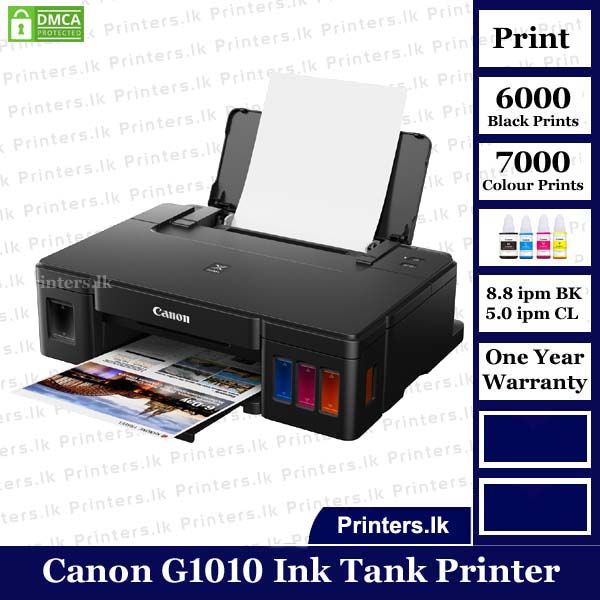
Canon Pixma G1010 Ink Tank Printer
$ 91.47
Canon Pixma G1010 Ink Tank Printer 8.3 TOTAL SCORE Very Good Overall 4.5 Out of 5 Based on 4 Users Print Quality 8 Design 8 User Friendly 9 PROS Low ink costHigh Volume PrintingLow cost spare parts CONS Not mac OS suppoted Bottomline Best Single-Function Ink Tank Printer Thank you for taking part in our survey 4.5 (4) Without worrying about running out on ink, the printer allows seamless printing with the high page yielding ink bottle up to 7000 pages. Built-in integrated ink tanks create a compact printer body. Users can also view remaining ink levels easily at a glance and never run out of ink. Enabling hassle-free and clean filling, The individual bottles fits onto the designated ink tank nozzle and ink filling stops automatically once the ink tank is full. With improved color image quality, the PIXMA printer prints sharp black text to enhance visibility and visuals. Allowing users to choose from over 100 types of templates, the printer creates posters or flyers for small businesses. Supporting borderless photo printing , the printer comes with a photo speed (10.16×15.24cm) in just 60 seconds. Canon Pixma G1010 Ink Tank Printer High Page Yield Ink Bottles With high page yield ink bottles up to 7000 pages, users can enjoy printing without having to worry about cost of ink, or ink supplies running low. Integrated Ink Tank System Canon Pixma G1010 Ink Tank Printer Built-in integrated ink tanks create a compact printer body. Users can also view remaining ink levels easily at a glance. Spill-Resistant Ink Bottle Design The ink bottles come with a special tip design that reduces spillage during ink refilling. Supports Borderless Printing Print borderless photos up to A4 size Canon G1010 Ink Print Maximum Printing Resolution 4800 (horizontal)*1 x 1200 (vertical) dpi Print Head / Ink Type: Individual Ink Bottle Number of Nozzles: Total 1,472 nozzles Ink Droplet Size: 2pl min Ink Bottle: GI-790 (Cyan, Magenta, Yellow, Black) Canon G1010 Printer Print Speed*2 Based on ISO / IEC 24734. Click here for summary report Click here for Document Print and Copy Speed Measurement Conditions Document: Colour: ESAT / Simplex: Approx. 5.0ipm Document: B/W: ESAT / Simplex: Approx. 8.8ipm Photo (4 x 6″): PP-201 / Borderless Approx. 60secs. Printable Width Bordered: Up to 203.2mm (8-inch) Borderless: Up to 216mm (8.5-inch) Printable Area Borderless Printing*3 Top / Bottom / Right / Left margin: each 0mm (Supported Paper Size: A4 / Letter / 4 x 6″ / 5 x 7″ / 8 x 10″) Bordered Printing Top margin: 3mm, Bottom margin: 5mm, Left / Right margin: each 3.4mm (Letter / Legal: Left: 6.4mm, Right: 6.3mm) Recommended Printing Area Top margin: 31.2mm Bottom margin: 32.5mm Canon G1010 Printer Paper Size A4, A5, B5, Letter, Legal, 4 x 6″, 5 x 7″, Envelopes (DL, COM10), Custom size (width 101.6 – 215.9mm, length 152.4 – 676mm) Paper Handling (Rear Tray) (Maximum Number) Plain Paper A4, A5, B5, Letter = 100, Legal = 10 High Resolution Paper (HR-101N) A4 = 80 Photo Paper Plus Glossy II (PP-201) 4 x 6″ = 20 Photo Paper Pro Luster (LU-101) A4 = 10 Photo Paper Plus Semi-Gloss (SG-201) 4 x 6″ = 20 Glossy Photo Paper “Everyday Use” (GP-601) A4 = 10, 4 x 6″ = 20 Glossy Photo Paper “Everyday Use” (GP-508) A4 = 10, 4 x 6″ = 20 Matte Photo Paper (MP-101) A4 = 10, 4 x 6″ = 20 Envelope European DL/US Com. #10 = 10 Canon G1010 Ink Tank Printer Paper Weight Rear Tray Plain Paper: 64 – 105g/m2 , Canon specialty paper: max paper weight : approx. 275g/m2 Photo Paper Plus Glossy II (PP-201) Ink End Sensor Dot count Print Head Alignment Manual Canon Pixma G1010 Price in Sri lanka & Enjoy after service What’s in the Box ? Main Unit Power Cord Set of Ink Installer USB Cable Printer Head Color and Black Manual Canon G1010 Printer Driver Download Q&A from Printers.lk Canon Pixma G1010 Ink Tank Printer Q: How do you charge ink on Canon G1010? A: Refilling Procedure Make sure that the power is turned on. Open the top cover (B). ... Open the ink tank cover. ... Grab and remove the tank cap (E) of the ink tank to be refilled. ... Take a new ink bottle out of its package. Hold the ink bottle upright and twist the bottle cap (F) to remove. ... Refill the ink tank. Q: How many pages can Canon Pixma G1010 print? A: 13000 total A4 Sized pages with 5% Coverage as per Canon Inc Q: How do I flush my Canon G1010 printer? A: Open Canon IJ Printer Assistant Tool. Click Ink Flush. When the Ink Flush dialog box opens, select the ink group for which ink flush is to be performed. ... Execute ink flush. Make sure that the printer is on and then click Execute. ... Complete ink flush. ... Check the results. Why Is My Canon Printer Not Installing? You can reinstall the printer driver after removing the failed printer driver. Select Custom Install from the Setup CD-ROM when you reinstall the printer driver. How Do I Reset My Canon Pixma G1010? Turn on the printer. Whenever an alarm is flashing 15 times, hold the RESUME/CANCEL button and release it. How Do I Install Canon Printer On My Laptop? A USB cable will connect the printer to your computer and you will need to turn it on after connecting it. Use the Start menu to open the Settings app. Click Devices. Simply click on the Add Printer or scanner link. You’ll need to click on the printer’s name on the Windows screen in order to complete installing it. How Do I Install Canon Printer On Windows 10? Fill up the CD-ROM drive with the Printer Driver Software CD-ROM. Navigate to the [My Computer] tab, then select the CD-ROM drive tab. You need to double-click [PCL] or [UFRII] to select [uk_eng]. The installation process can begin by double-clicking the [Setup.exe] icon. Can You Set Up A Canon Printer Without The Disc? It is usually sufficient to download and install the USB cable for using a printer without a disc. For older printers, you may need to download software over the internet. How Do I Install A Canon Printer On Windows 10? To open your Printers & scanners settings, select Settings > Devices > Printers & scanners from your Start menu. After it has matched nearby printers, proceed to Add a Printer or scanner, then select the printer or scanner you’d like to use. Why Is My Canon Printer Not Connecting To My Computer? Once the printer is powered on, simply turn it off. The printer should then be taken off from the power supply. Disconnect the back of the printer’s power cable. It is recommended that you wait 30 seconds before connecting it. If the printer is connected after it has been reconnected, use the power button on it to switch it back on. Why Printer Cannot Installation Failed? It is not uncommon for printer driver installations to fail due to incompatible drivers, outdated or unsuitable drivers, or a problem during installation. What Will Happen If I Reset My Canon Printer? It will clear all settings and stipulations that you have set up after you have purchased the Canon printer by setting it back to its default factory setting. In order to set this up again, it would be necessary to connect your printer back to your network and re-establish the whole setup process. How Do I Fix Error On Canon G1010 5B00? Using the ink fountain in the printer, you might need to put it on the low setting and turn it off. The power and the USB cables connected to them can be disconnected. Take care of the waste ink pad on its own using a manual scrubbing device. Other possible solutions may include cleaning the print head in order to prevent an error like this. How Do I Reset My Canon Pixma Printer? Press Setup. Enter Device settings by pressing the arrow buttons. Then, press OK in the Reset setting section after selecting Reset setting. Make sure the arrow buttons are touching Reset all before moving on to Reset all. Select Yes. You’re good to go now. Just click OK to reset your device. How Do I Service My Canon G1010? Canon Pixma G1010 Ink Tank Printer The Canon IJ Printer Assistant Tool can be opened here. When the Print Head Cleaning dialog box appears, click the Cleaning button. Pick the ink group for which the cleaning will be performed next. You should have the printer operating and then click Execute. Complete cleaning. Check the results. Canon G1010 Printer Driver
Related products
-26%

White
Electric Water Heater
Canon PIXMA MegaTank G3770 Red All-in-one WiFi Inktank Colour Printer
$ 91.09
-44%

White
Electric Water Heater
Epson Ecotank L3250 A4 Wi-Fi All-in-One Ink Tank Colour Printer Ink
$ 98.71